Project memory
for your agents.
Decibel Tools gives your AI agents a shared memory for issues, decisions, plans, and learnings. Every session picks up where the last one left off. Your agents maintain project flow and issue tracking as they work.
Tools 3.0 keeps the work connected
Major releaseEvery AI tool works from the same project memory. Issues, decisions, and next steps stay connected across agents and sessions.
Never start cold
New sessions know what happened, why decisions were made, and what comes next.
Replace Jira busywork
Agents create, update, link, and close issues while they do the work.
Keep projects moving
Turn ideas into plans, plans into issues, and completed work into durable knowledge.
Trust the record
Your memory lives in readable files beside the code. Your team can open, review, and share every record.
What Tools does for you
Turn project management from another place you have to update into a memory your agents maintain as they work.
AI driven issue tracking
Your agent turns plans and discoveries into issues, keeps them current, and closes them when the work is done.
> "Plan the auth work, create the
  issues, and keep them updated"
Memory for every agent
Decisions, constraints, and lessons carry across sessions and tools. Each agent begins with the full project context.
> "What did we decide about auth,
  and why?"
A living project flow
Ideas become plans, plans become tracked work, and shipped work becomes knowledge the next agent can use.
> "What should we work on next?"Quick Start
Connect in 2 minutes. Install and add the config to your AI client.
Install
npm install -g @decibelsystems/toolsOr run directly with npx:npx @decibelsystems/tools
01 Cursor
Add to ~/.cursor/mcp.json:
json{
  "mcpServers": {
    "decibel-tools": {
      "command": "npx",
      "args": ["-y", "@decibelsystems/tools"]
    }
  }
}
02 Claude Code
Install as plugin (recommended):
/plugin marketplace add
  decibelsystems/decibel-tools-mcp

/plugin install
  decibel-tools@decibel-marketplace
03 Claude Desktop
Add to claude_desktop_config.json:
json{
  "mcpServers": {
    "decibel-tools": {
      "command": "npx",
      "args": ["-y", "@decibelsystems/tools"]
    }
  }
}
04 VS Code
Install from the marketplace:
ext install decibel-systems.decibel-toolsHow it works
Local-first. Committed to git. Forkable. Works offline.
Decibel Tools creates a .decibel/ folder in your project. Every artifact (issues, ADRs, experiments, learnings) is committed as YAML alongside your code. The MCP server exposes them to your AI tools.
your-project/
└── .decibel/
    ├── sentinel/
    │   ├── issues/      # ISS-0001.yml
    │   └── epics/       # EPIC-0001.yml
    ├── architect/
    │   ├── adrs/        # ADR-0001.yml
    │   └── policies/    # POL-0001.yaml
    ├── dojo/
    │   ├── proposals/   # DOJO-PROP-0001.yml
    │   └── experiments/ # DOJO-EXP-0001/
    ├── designer/        # Design decisions
    ├── friction/        # Pain point logs
    ├── learnings/       # Knowledge docs
    ├── context/         # Pinned facts
    └── voice/inbox/     # Voice messages
Project management that happens in the flow
Tell your agent what you want to accomplish. The plan and project record update as the work moves forward.
Turn goals into work
- 1Describe the outcome
- 2Your agent builds the plan
- 3Issues stay linked and current
"Plan user authentication, break it into issues, and start with the highest priority."
Remember the why
- 1Capture the decision
- 2Connect it to the work
- 3Future agents follow it
"Remember that we chose sessions over JWT, including the reasons and constraints."
Learn as you ship
- 1Notice friction and gaps
- 2Record what worked
- 3Carry learning forward
"Capture what we learned from this release and use it when planning the next one."
See it in action
Voice capture from the mobile app becomes structured artifacts in your repo.
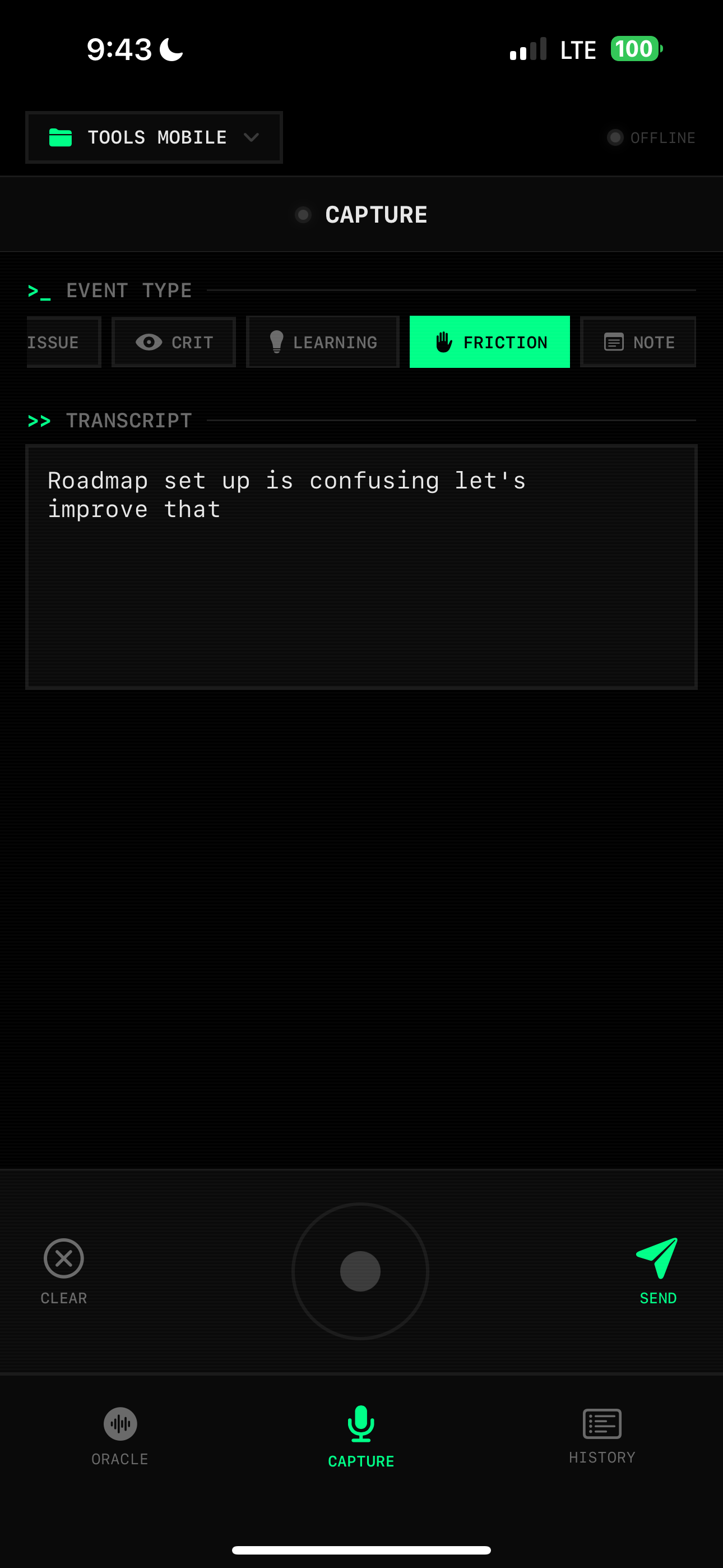
Voice memo on a walk → auto-routed to issues, proposals, friction logs. Oracle surfaces health, roadmap, and priorities.
Capabilities when you need them
Memory, issue tracking, planning, security, and moreYour agent chooses the right capability for issue tracking, decisions, planning, security, and more.
Sentinel
Issues, epics, specs, scanning
Dojo
Proposals and experiments
Architect
ADRs, policies, oversight
Roadmap
Strategy, milestones, health
Oracle
Recommendations and priorities
Designer
Design decisions and critiques
Git
History, changes, issue links
Workflow
Preflight, ship, investigate
Vector
Agent runs, drift, scoring
Context
Pinned facts and events
Auditor
Code health and refactor scores
Forecast
Estimates and capacity
Velocity
Trends and contributors
Coordinator
Multi-agent locks and logs
Swarm
Shared agent sessions
Peers
Peer discovery and messaging
Concepts
Project concept graph
Friction
Pain points and signals
Registry
Project discovery and aliases
Feedback
Tool feedback
Learnings
Living knowledge documents
Provenance
Audit trail
Bench
Benchmarks and comparisons
Guardian
3.0Security scanning and grading
Postoffice
3.0Threaded agent-to-agent messaging
Conductor
3.0Runs, traces, cost, and routing
Status
Shipped
- Tools 3.0 unified runtime
- 26 core facades · 183 actions
- Pro: 31 facades · 224 actions
- Guardian security scanning
- Postoffice agent-to-agent messaging
- Conductor runs, traces, cost, and routing
- Hardened HTTP daemon
- 881-test release gate
In Active Development
- ChatGPT integration
- Replit integration
- Playbooks with typed artifact outputs
- Additional Pro adapters and team workflows
Early Exploration
- Zoom meeting-summary ingestion (ships disabled)
- Mobile voice-capture app
- Domain-scoped agents
- Team sync and dashboards
Who it's for
Solo builders who've outgrown their first AI-powered prototypes.
Small teams with a real product and a codebase that's getting away from them.
Technical founders who want AI to understand and strengthen their architecture.
If you're already shipping with AI and feel the entropy building up, you're the audience.
Let's start with your current stack.
We're inviting a small number of teams into a hands-on private preview. You bring your repo and your reality. We bring Decibel Tools and help wire it up.
Drop an email, DM, or whatever channel you found us through, and we'll talk scope, fit, and next steps.